
This guide gets seine running on a Linux desktop or server, from choosing the archive to checking accepted pool shares. It uses the official v0.2.26 release as its verified example. Have your Blocknet receiving address ready; the wallet guide explains where to find it. You enter a public address or registered @name, never a wallet recovery phrase.
How do you start mining Blocknet on Linux?
Choose the Linux archive that matches your processor, verify its SHA-256 checksum, and extract it into a writable folder. Run ./seine, enter your payout address, and accept the default bntpool.com connection. seine sizes CPU threads automatically and can also use supported NVIDIA cards on Linux x86_64 when their runtime libraries are installed.
Step 1: check your architecture and glibc
Open a terminal and run these two read-only checks. The first identifies the machine architecture; the second prints the GNU C library version on a glibc-based system. They do not start mining or change the computer’s configuration.
uname -m
getconf GNU_LIBC_VERSION
Match the architecture to the archive below. Both v0.2.26 Linux packages require glibc 2.39 or newer. Check the release requirements again when installing a later version. If your system uses another C library, or an older glibc, use a compatible distribution environment or follow the source-build instructions.
| Command output | Release archive | Backends |
|---|---|---|
x86_64 |
seine-linux-x86_64.tar.gz |
CPU and NVIDIA |
aarch64 |
seine-linux-aarch64.tar.gz |
CPU |
Each CPU mining thread needs a 2 GiB memory block. seine chooses a starting thread count from available memory and CPU resources, then tunes while mining. Leave thread and kernel overrides unset for your first run; you can establish a working connection before changing performance settings.
Step 2: download and verify the archive
Choose Linux or Linux ARM64 in the download section. From the same official release, download the release-level SHA256SUMS.txt asset as well. Keep the archive and checksum file from the same version together. The examples below use x86_64; on ARM64, replace seine-linux-x86_64.tar.gz with seine-linux-aarch64.tar.gz in the commands.
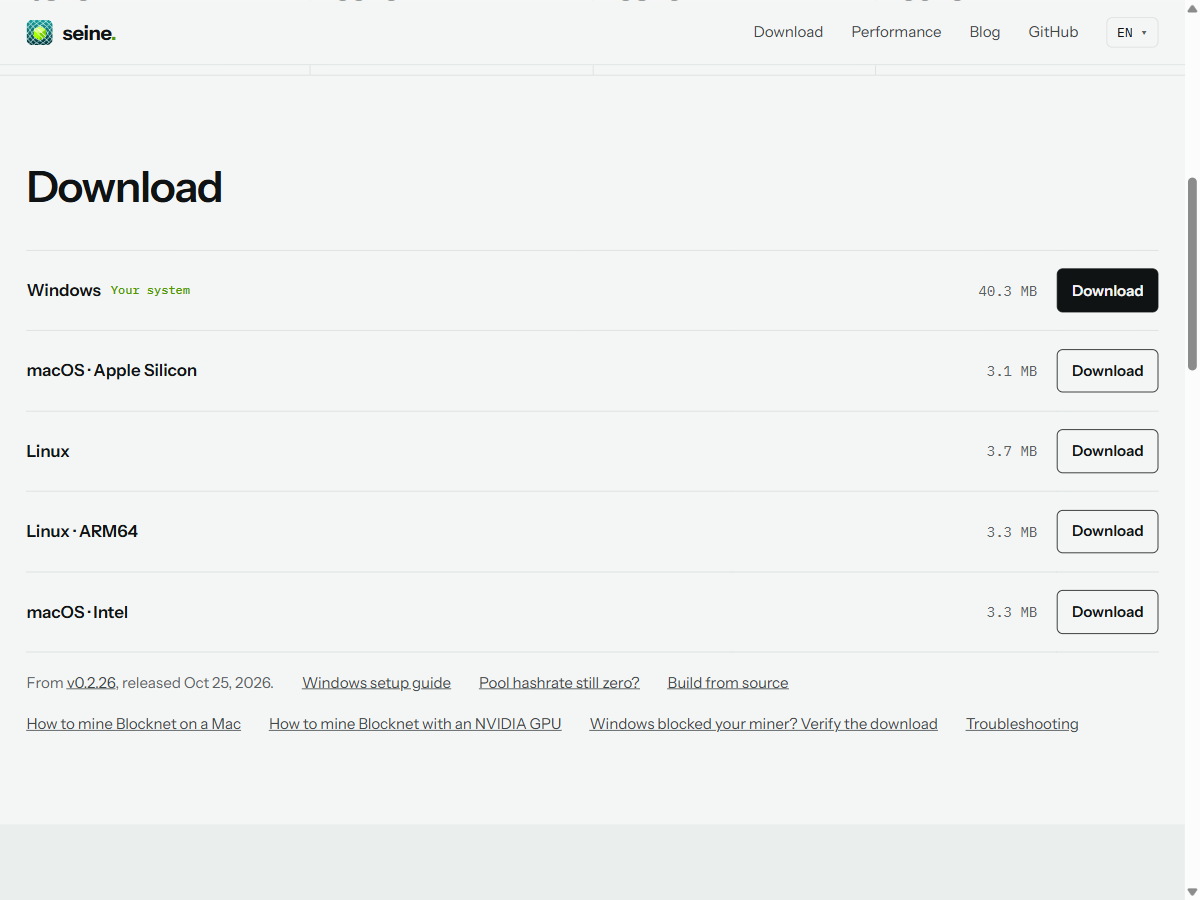
In your terminal, open the directory where the browser saved the files and compute the archive’s checksum. This example assumes a Downloads folder beneath your home directory; use your actual download directory if it has another name.
cd "$HOME/Downloads"
sha256sum seine-linux-x86_64.tar.gz
Compare the complete hexadecimal hash with the line for that exact archive in the downloaded SHA256SUMS.txt. Every digit must match before you extract or run it. Use the release-level checksum file for this comparison: the archive also contains a manifest for its extracted files. A matching checksum verifies the file against the published value; obtain both downloads from the official source.
Step 3: extract and check the executable
Create a dedicated folder under your home directory, extract the archive into it, and ask the binary to print its help. The v0.2.26 archive contains ./seine at its root, so these commands put the executable directly inside the new folder. The help command exits without starting a mining session.
mkdir -p "$HOME/seine"
tar -xzf seine-linux-x86_64.tar.gz -C "$HOME/seine"
cd "$HOME/seine"
chmod u+x ./seine
./seine --help
Run these steps as your own account. chmod u+x grants execute permission to the file’s owner; it does not need a system-wide installation. The ./ prefix tells your shell to run the file in the current directory. Keep the extracted documentation and license files with the binary.
Step 4: enter your address and connect
Start from the extracted folder:
./seineEnter your receiving address or registered @name, accept stratum+tcp://bntpool.com:3333, and choose a recognizable rig name when prompted. On later starts, seine reuses seine-data/seine.config.json relative to the working directory. Starting from the same folder keeps those settings easy to find. The configuration reference documents the prompts and data directory.
Watch the miner’s hashrate and accepted-share counter. Then open My Stats and look up the same receiving address. Accepted shares confirm that the pool is receiving work; a payment follows the separate reward and payout process. The dashboard guide explains the miner’s panels. Press q or Ctrl+C to stop cleanly.
What do you need for NVIDIA mining on Linux?
Linux x86_64 GPU mining needs an NVIDIA driver and compatible NVRTC runtime libraries. NVRTC compiles the GPU kernels at startup. Install the runtime and its matching builtins library through your distribution or NVIDIA’s packages, following the NVIDIA setup guide. Package names depend on the distribution and CUDA version, so use the instructions for your system.
With those libraries available, the default mode can mine on the CPU and supported NVIDIA cards together. To establish CPU mining while preparing the GPU runtime, select it explicitly:
./seine --backend cpuThis is a CPU-only choice for that invocation. For GPU device selection and accepted GPU shares, continue with the NVIDIA guide. The ARM64 release described here contains the CPU backend; installing CUDA does not add an NVIDIA backend to that archive.
How do you resolve a Linux startup error?
Use the first error message to choose the next check. An architecture or runtime error happens before accepted shares, so changing pool addresses or thread counts will not fix that stage. Keep the verified archive available while you check the executable and environment.
| Message or symptom | What to check |
|---|---|
Exec format error |
Wrong architecture: compare uname -m with the archive filename. |
GLIBC_2.39 not found |
The binary requires a newer glibc. Use a compatible system or build from source; keep the system C library managed by your distribution. |
Permission denied |
Check user execute permission and use a folder on a filesystem that permits execution. |
libnvrtc / libnvrtc-builtins |
Install the compatible NVIDIA runtime and matching builtins library, or use --backend cpu while preparing it. |
Once shares are accepted, the huge-pages guide covers optional Linux page setup. The server guide covers headless operation and NUMA placement. Neither preparation is required to follow this first-run walkthrough; keep each change separate so you can tell what changed on your machine.
Frequently asked questions
Which Linux archive should I download?
Run uname -m in your terminal. Choose the x86_64 archive for x86_64 output or the aarch64 archive for aarch64 output. The reviewed v0.2.26 Linux binaries require glibc 2.39 or newer. The x86_64 package supports CPU and NVIDIA mining; the ARM64 package is CPU-only.
Do I need to run seine with sudo?
Run the normal miner as your own user from a writable folder. Extract the archive, give the executable user execute permission if needed, and start it with ./seine. Preparing reserved huge pages is a separate administrative task; ordinary startup can use regular pages.
Why does Linux report a missing NVRTC library?
The Linux NVIDIA backend needs a compatible driver and NVRTC runtime libraries, including the matching builtins library. Install them through your distribution or NVIDIA's supported packages. The Linux archive does not bundle the Windows DLLs. You can select the CPU backend while preparing GPU support.