
You want to receive Blocknet or start mining, and three names appear in the setup instructions: wallet, node and miner. They describe different jobs, even when one application includes more than one of them. Understanding those jobs helps you install the right software, keep private keys in the right place and know which process needs to stay open.
What is the difference between a wallet, node and miner?
A Blocknet wallet manages your keys and identifies your funds. A node follows and validates the blockchain. A miner performs proof-of-work calculations. For pool mining, seine connects to a pool that handles the mining node connection; your wallet can remain on a separate trusted computer where you manage payments.
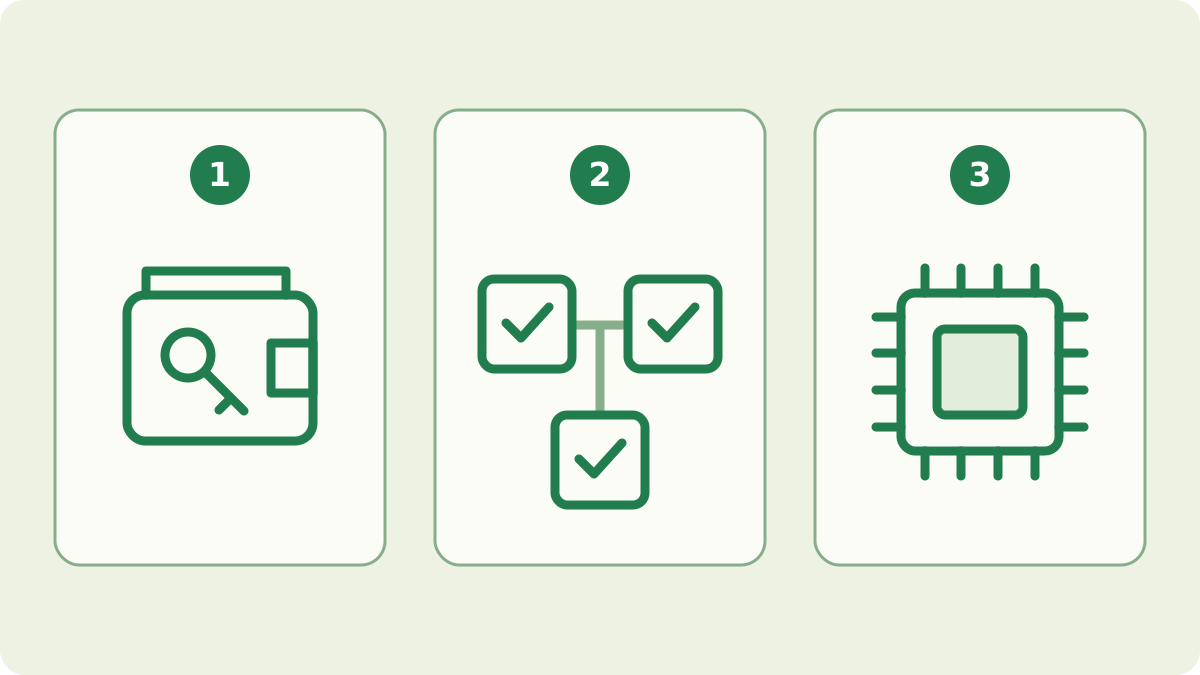
Three jobs, sometimes in the same application
The official Blocknet software combines node and wallet functions, which is why a wallet guide also mentions starting a core and waiting for synchronization. The command-line client manages that core and opens an interactive shell for wallet commands. seine is a separate mining application. Its default mode connects to a pool, while its direct mode connects to a node you operate.
| Role in the illustration | Main job | When you need it |
|---|---|---|
| 1. Wallet | Manage keys, find your payments and authorize spending | To manage your own funds |
| 2. Node | Follow and validate the chain; provide blockchain data | For the official wallet workflow or your own direct mining connection |
| 3. Miner | Calculate proof of work from mining jobs | When you choose to mine |
The roles can share a computer, but they do not have to. Installing one component does not mean that every other component is running. Start with the action you want to take, then choose the setup that supports it.
What does the wallet actually hold?
The wallet holds the keys and local information needed to find and spend your funds. Coins are accounted for on the blockchain; copying a wallet file does not create another balance. Two copies of the same full wallet can give access to the same funds, which is why backups need the same care as the active wallet. A public receiving address identifies where others can pay you.
For a new wallet, follow the wallet setup guide, then keep a protected backup using the backup and recovery guide. A pool connection needs your receiving address or supported name, not your recovery seed, wallet file or wallet password. You can put the public payout destination on several mining machines while keeping the full wallet on the computer where you manage funds.
What does the node do for the wallet?
The node connects to peers, follows the blockchain and validates the chain it accepts. The wallet then scans chain data to recognize its own outputs. These are related but separate kinds of progress: a node can still be downloading blocks, or the node can be caught up while the wallet is still scanning. An early balance during synchronization may therefore be incomplete.
The node guide covers starting the official core and checking its connections. The wallet synchronization guide explains which progress readings to inspect. Running a node does not by itself earn mining rewards. The core can include mining functionality, but following the chain and actively performing mining work remain separate actions. Check whether a mining process is actually working before treating the computer as a miner.
What do seine and the pool each do?
seine receives a mining job and repeatedly calculates proof of work with the enabled hardware. In pool mode it sends qualifying shares back to the pool. The pool checks those submissions, communicates with its upstream node, submits solved blocks and keeps the records used for rewards and payouts. A share accepted by the pool is a mining result, not an immediate payment transaction to your wallet.
This arrangement lets a mining rig connect directly to the pool without keeping its own blockchain copy for mining. Use the Blocknet mining guide for setup and the pool tracking guide to find your mining activity and payment records. Your pool balance and your wallet balance answer different questions: one concerns pool accounting, while the other concerns payments the wallet has found on the chain.
Which applications need to keep running?
To continue pool mining, keep seine running with a working pool connection. The wallet application can be closed while a payment is recorded on the chain; when you open it again, allow the node and wallet scan to catch up. If the wallet is on a separate computer, closing it does not stop the miner. Shutting down the computer that runs seine does stop its mining work.
Closing an attached Blocknet shell is different from stopping the background core: the core reference documents that distinction. The wallet reference also explains that remembering a wallet file path does not automatically open the wallet after a restart. In the reviewed official client, start the core, attach and use load with your wallet password when you need the wallet again.
When do you need your own node for mining?
You need your own node connection when you deliberately choose direct mining instead of the pool workflow. In seine’s daemon mode, the miner asks your running core for work and submits results back to it. That core must be ready to serve the mining connection, and the connection must be authenticated. The miner and core both need to remain available for that setup to keep working.
For a first pool setup, use the default pool path and your public payout destination. You can learn how to operate a node separately without making it a prerequisite on every rig. If you want the direct path, follow the seine solo-mining documentation for its configuration and authentication requirements. Keep the two connection modes distinct when troubleshooting: a pool connection problem and a local core problem involve different services.
Choose your next step from what you want to do
If you want to receive or send Blocknet, begin with the wallet and its node workflow; you do not need to mine to own or use coins. If you want to mine to an existing wallet, prepare its public payout destination and configure seine for the pool. If you want to operate your own direct mining connection, add the node setup and follow the daemon-mode instructions.
Before changing software, identify the symptom and its owner. A missing miner belongs in the miner and pool connection checks. A payment already sent but absent from a wallet belongs in wallet selection and synchronization checks. An unpaid pool balance belongs in the pool’s accounting and payout information. That first distinction will usually point you to the relevant guide without reinstalling unrelated applications.
Frequently asked questions
Do I need a Blocknet node on every mining computer?
For pool mining with seine, each mining computer connects to the pool and uses your payout address or supported name. The pool operates the node connection used for mining jobs and block submission. Keep your wallet on a trusted computer; you do not need to copy its private keys to each mining rig.
Will I miss a payout if my Blocknet wallet is closed?
Your wallet application does not have to be open when a payment is recorded on the blockchain. When you return, let the node synchronize and the loaded wallet scan the missing blocks before judging its balance. Pool balances awaiting payout are separate from coins that have already been sent to your wallet.
Does starting a Blocknet node automatically start mining?
Following and validating the blockchain is a separate activity from searching for proof of work. A node can provide mining functionality, but running it does not by itself mean that you are mining. Check the actual mining process and its reported work; use seine’s pool or direct mode deliberately.